
CVE-2026-85863: Windows Clipboard User Service Use-After-Free Analysis
Technical root-cause analysis of CVE-2026-85863, a CVSS 7.8 Use-After-Free flaw in Windows ClipSVC.exe. Discover architectural mechanics, telemetry, and hardening.

The boundary between user space convenience and elevated operating system compromise often hinges on the quietest background brokers.
In October 2026, security researchers identified a critical memory management flaw tracked as [CVE-2026-85863](https://nvd.nist.gov/vuln/detail/CVE-2026-85863) within the Microsoft Windows Clipboard User Service (`ClipSVC.exe`). Carrying a CVSS v3.1 base score of 7.8 (Local Attack Vector, Low Attack Complexity, Low Privileges Required), this Use-After-Free (UAF) vulnerability presents an immediate local privilege escalation (LPE) vector across supported Windows desktop and server builds. An authenticated, unprivileged user process can trigger premature deallocation in the service heap and subsequently reference the dangling pointer, enabling arbitrary code execution within the security context of the service. With post-exploitation frameworks increasingly automating LPE vectors, the [CISA Known Exploited Vulnerabilities Catalog](https://www.cisa.gov/known-exploited-vulnerabilities-catalog) has underscored the urgency of remediating component-level memory flaws that enable [MITRE ATT&CK T1068: Exploitation for Privilege Escalation](https://attack.mitre.org/techniques/T1068/).
Note what this means: Decades of memory safety advances in the Windows kernel cannot insulate an operating system when legacy user-mode system services continue to manage complex session state in unmanaged C/C++. When an unprivileged user process can trigger premature deallocation in a shared service broker and subsequently interact with stale heap references, our endpoint security models fail at the architectural seam between user isolation and shared utility. Why does this keep happening? Because operating systems prioritize backward compatibility and lightweight inter-process communication over strict memory isolation boundaries for ubiquitous productivity features.
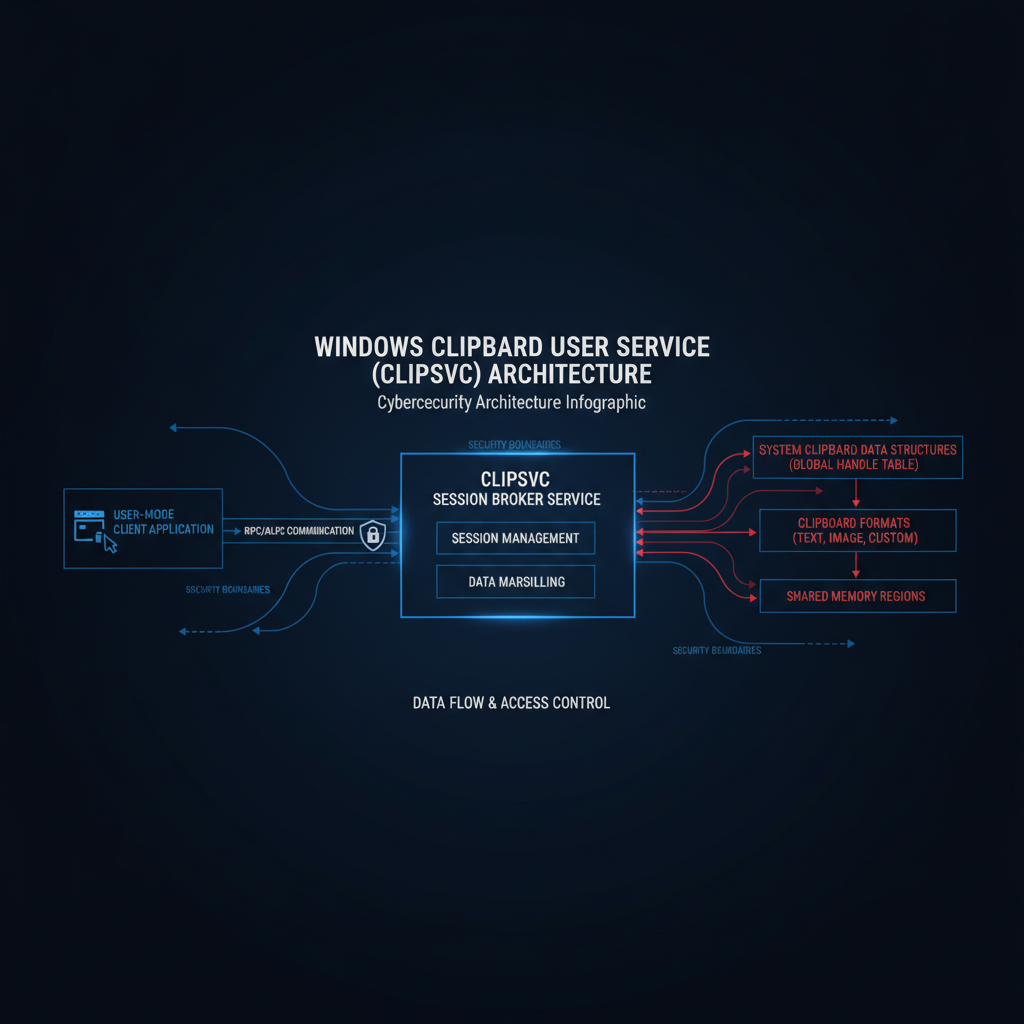 *Figure 1: Windows Clipboard User Service (ClipSVC) RPC Architecture and Session Brokering Model.*
Architectural Analysis: The Role of ClipSVC
The Windows Clipboard User Service (`ClipSVC`) is responsible for managing clipboard infrastructure, mediating cross-application copy-paste operations, brokering modern cloud clipboard history, and handling application licensing telemetry across user sessions. Unlike legacy user32 clipboard APIs that operated largely within a single desktop station, modern Windows releases rely on `ClipSVC.exe` as an RPC and ALPC server that negotiates data transfer across sandboxed AppContainer boundaries and multi-user environments.
To maintain clipboard synchronization, `ClipSVC` exposes local Remote Procedure Call (RPC) interfaces over named pipes and ALPC endpoints. Client applications register session handles and clipboard format listener structures with the service. When an unprivileged application interacts with these interfaces, the service dynamically allocates tracking objects on its process heap to maintain metadata, data formats, and callback pointers associated with the requesting session.
> ⚠️ BreachModal Insight: System services that bridge low-integrity AppContainer sandboxes with privileged desktop sessions represent high-value attack surfaces. Threat actors do not need remote exposure when local background services offer direct pathways to elevated execution contexts.
Root Cause Analysis: The Use-After-Free Lifecycle
The vulnerability in `ClipSVC.exe` stems from an improper object lifetime management pattern (CWE-416: Use After Free). During specific session teardown and format renegotiation sequences, the service deallocates the session tracking object but fails to nullify or remove the active pointer stored in the service's internal dispatch table.
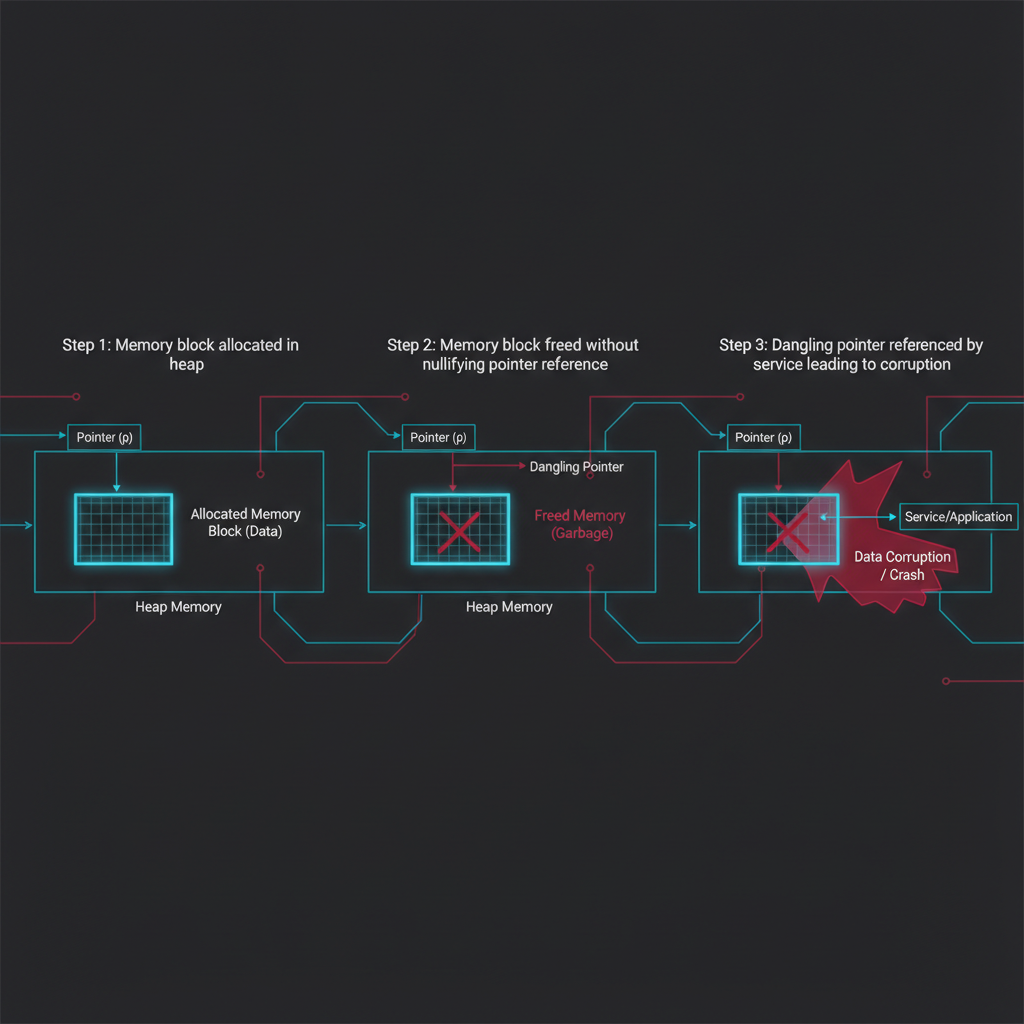 *Figure 2: Memory lifecycle state machine illustrating the dangling pointer vulnerability in ClipSVC.*
The defect unfolds through the following operational phases:
1. Object Allocation & Registration: An unprivileged client process connects to the `ClipSVC` RPC interface and requests a clipboard format registration. The service allocates an internal tracking descriptor on the process heap via `HeapAlloc` or standard C runtime allocators and stores the reference pointer in an indexed session array. 2. Premature Deallocation: When the client sends an unregister request or forces an abrupt socket termination during a partial handshake, the cleanup handler invokes `HeapFree` on the tracking descriptor. However, due to a missing reference count decrement guard, the service frees the underlying memory block while leaving the pointer intact in the dispatch table. 3. The Dangling State: The pointer now addresses an unallocated chunk of virtual memory within the `ClipSVC.exe` process heap. The memory remains marked as free, ready for reallocation by subsequent heap operations. 4. Use-After-Free Trigger: When the service subsequently receives a notification or queries the session table during a routine clipboard synchronization event, it dereferences the dangling pointer without validating its allocation state. If an unprivileged local process has arranged memory allocations to reuse that heap address, the service operates on attacker-influenced memory, leading to memory corruption and control flow diversion.
There is a particular kind of irony in an attacker taking over an entire workstation simply by asking the clipboard service to remember what they copied five seconds ago.
> 🧩 Tactical Note: Because `ClipSVC` runs with elevated user token privileges, hijacking the service's execution flow allows an attacker to bypass standard User Account Control (UAC) and escalate directly to the service's operating context.
Telemetry and Threat Hunting
If you were the CISO here, your endpoint detection and response (EDR) platform would likely observe repeated crashes in `ClipSVC.exe` preceding any successful privilege escalation attempt. Heap manipulation in local services rarely achieves stable execution on the first try, producing distinctive telemetry in Windows Event Logs and crash reporting subsystems.
1. Application Error Telemetry (Event ID 1000)
When exploitation fails or triggers an unhandled memory violation, Windows logs an Application Error event. Defenders should monitor for recurring crash patterns involving `ClipSVC.exe`:
* Log Name: Application * Source: Application Error * Event ID: 1000 * Faulting Application Name: `ClipSVC.exe` * Exception Code: `0xc0000005` (STATUS_ACCESS_VIOLATION) * Faulting Offset: Offset within the service dispatch routine
2. Windows Error Reporting (Event ID 1001)
Simultaneously, Windows Error Reporting generates Event ID 1001 entries indicating `APPCRASH` buckets targeting `ClipSVC.exe`. A spike in WerFault activity associated with clipboard processes from non-standard desktop sessions is a strong indicator of local fuzzing or exploitation.
3. Sysmon & Process Creation Monitoring
Defenders should track anomalous child processes or unusual module loading patterns surrounding `ClipSVC.exe`. While `ClipSVC` should typically communicate via RPC without spawning interactive utilities, exploitation chains often attempt to spawn `cmd.exe`, `powershell.exe`, or load unauthorized DLLs from user-writable directories.
```yaml title: Suspicious Process Spawning or Crash Loop in ClipSVC id: 85863b1a-9f24-4f51-b841-e97d1e892026 status: experimental description: Detects unusual process activity or abnormal execution related to Windows Clipboard User Service (ClipSVC.exe). logsource: category: process_creation product: windows detection: selection_parent: ParentImage|endswith: '\ClipSVC.exe' selection_children: Image|endswith: - '\cmd.exe' - '\powershell.exe' - '\pwsh.exe' - '\rundll32.exe' - '\whoami.exe' condition: selection_parent and selection_children falsepositives: - Rare administrative diagnostic scripts level: high ```
Defensive Validation & Diagnostic Walkthrough
Security engineers and incident response teams can validate whether endpoints are running vulnerable revisions of `ClipSVC` and verify proper service configuration without running dangerous exploit payloads.
Step 1: Query Service State and Binary Metadata
Verify the service configuration and file version of `ClipSVC.exe` using PowerShell:
```powershell Inspect ClipSVC Service Configuration Get-Service -Name "ClipSVC" | Select-Object Name, DisplayName, Status, StartType
Inspect Binary Version and Digital Signature $binaryPath = "$env:SystemRoot\System32\ClipSVC.exe" Get-ItemProperty -Path $binaryPath | Select-Object VersionInfo Get-AuthenticodeSignature -FilePath $binaryPath | Select-Object Status, SignerCertificate ```
*Expected Output:* The service should be set to `Manual` or `Automatic (Trigger Start)`. Digital signature validation must return `Valid` signed by Microsoft Windows Production PCA.
Step 2: Audit Active RPC Endpoints
Check for open RPC and ALPC handles associated with clipboard brokering:
```powershell Audit ClipSVC process and handle footprint Get-Process -Name "ClipSVC" -ErrorAction SilentlyContinue | Select-Object Id, ProcessName, Handles, WorkingSet64 ```
Step 3: Enable Exploit Protection and Heap Auditing
For targeted high-assurance workstations, administrators can enforce strict heap mitigation and process termination on corruption via Windows Exploit Guard:
```powershell Enforce TerminateOnError and strict handle checks for ClipSVC Set-ProcessMitigation -Name "ClipSVC.exe" -Enable TerminateOnError, StrictHandleCheck ```
> 🧠 CISO Brief: Prioritize workstation fleet patching with the same urgency as edge servers. Local Privilege Escalation vulnerabilities in default Windows services provide the indispensable second link in intrusion chains, turning initial phishing execution into domain-wide credential compromise within minutes.
Remediation and Hardening Strategy
Organizations must implement a structured remediation protocol to neutralize CVE-2026-85863 across enterprise endpoints:
1. Deploy Official Microsoft Security Updates: Apply the latest Windows cumulative security updates addressing CVE-2026-85863. Microsoft's patch properly introduces reference counting and explicit pointer nullification during session object deallocation, eliminating the dangling reference condition. 2. Enforce Exploit Guard Mitigations: Ensure Windows Exploit Guard policies enforce Control Flow Guard (CFG) and Arbitrary Code Guard (ACG) across standard system binaries. 3. Attack Surface Reduction (ASR): Enforce ASR rules restricting child process creation from standard desktop applications, preventing malicious initial access loaders from leveraging local RPC services to elevate privileges. 4. Endpoint Telemetry Baselines: Establish alerting thresholds for repeated `ClipSVC.exe` crashes (Event ID 1000) across workstation fleets to identify exploitation attempts during early intrusion stages.
FINAL VERDICT
CVE-2026-85863 demonstrates that ubiquitous desktop conveniences remain potent attack vectors when memory lifetime contracts are breached. The risk is borne by enterprise fleets that treat workstation patching as secondary to data center servers. When an unprivileged process can hijack a core operating system broker through a simple Use-After-Free condition, the entire local security boundary collapses. Enterprise security teams must deploy the official security updates immediately, enforce Exploit Guard protections, and monitor endpoint telemetry for telltale service crashes.
*Need immediate assistance evaluating endpoint exposure or assessing advanced privilege escalation vectors? [Contact BreachModal's Adversarial Simulation and Response team today.](/contact)*
Want this expertise working for your team?
Schedule a 30-minute call and we'll walk through your specific security posture.
Book a consultation